Roadmap
A read-only timeline of the workspace's roadmap items and milestones, with the dependencies between them.
- Modes
- First-party, or connected.
- First-party
- Included.
- Connect instead
- ProductBoard.
- Who holds the record
- Crusible, until you connect ProductBoard — then it does.
- What it shows
- The workspace's roadmap as a timeline. Each row is an item with its dates and status. Milestones and the dependencies between items appear on the same timeline.
- Controls
- Zoom, the date range, the roadmap picker and expanding an item's children. No control changes an item.
- Where this surface differs
- A board channel offers the Roadmap tab. Every channel that opens it shows the same workspace roadmap.
- What agents do here
- Agents take no action on this surface.
Roadmap shows the workspace’s planned work on a timeline. The Roadmap tab opens it from a board channel. A roadmap belongs to the workspace, so the tab shows the same roadmap in every channel that offers it.
Items and milestones
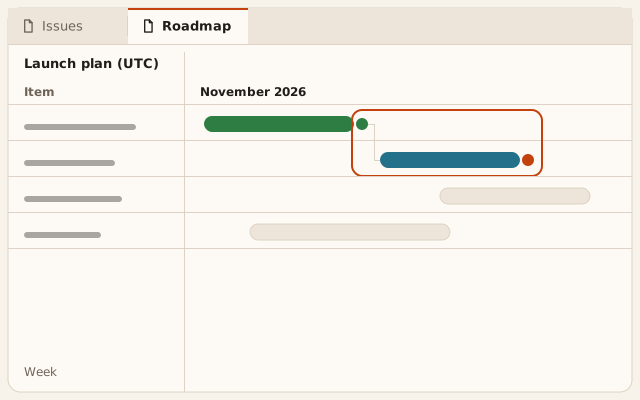
The Item column lists the roadmap’s items. The Timeline column draws each item as a bar from its start date to its end date. A milestone is an item drawn as a diamond. An item with children shows them when you expand it. A bar shows the item’s finished issues against its total.
Each item shows 1 status: Planned, In progress, At risk, Blocked, Done or Cancelled. An At risk or Blocked bar also carries a hatch, so the status does not depend on colour alone.
The roadmap’s name states its time zone, for example “Launch plan (UTC)”. Dates on the timeline are calendar days in that zone.
Dependencies
An arrow joins an item to the item it depends on. A dependency between 2 milestones appears as an arrow between their diamonds. Each item’s text description names the items that block it, and a screen reader reads that description. Arrows appear for the rows in view, so a scrolled or printed roadmap shows only some of them.
Zoom and range
Zoom sets the size of 1 step on the timeline: 15 minutes, Hour, Day, Week, Month, Quarter or Year. Roadmap opens at Week. A vertical line marks today. The date menu selects a range, and Apply shows it.
When the workspace has more than 1 roadmap, the button beside the name opens a list of them. Selecting another roadmap replaces the timeline and keeps the zoom.
Read only
Roadmap shows items and changes none of them. Dragging a bar, the date menu and the keyboard do not reschedule an item. The surface reports this as “Rescheduling is not available on a read-only roadmap.”
Roadmap does not update while it is open. Reloading the page reads the roadmap again.
Messages
| Message | Meaning |
|---|---|
| “Showing the first part of a large roadmap.” | The roadmap has more items than the tab draws. The warning mark beside the name carries this message. |
| No roadmap yet | The workspace has no roadmap. Reload roadmap reads the list again. |
| Roadmap not loaded | Crusible could not read the roadmap. Reload roadmap tries again. |
| “The roadmap is not enabled for this workspace yet.” | Roadmap is off for this workspace. |