Compass
Compass researches a question on the web and writes a cited answer into a document, within limits set for each channel.
- What it does
- Compass searches the web, reads pages and writes a cited answer into a document. It also finds, files and updates issues, and lists, reads and posts in channels.
- What it posts
- A reply in the conversation, with each tool step it ran, and a document that holds the answer and its sources. Compass posts no result card.
- What it needs from you
- A question in a direct message or a channel mention. Where it matters, the material to read.
- Permissions it can hold
- Compass acts for the person who asked. In a channel it reaches that channel only. In a direct message with you, it reads any channel you can see. A channel's Agents may edit documents setting decides whether it writes there.
- Costs and limits
- One reply runs up to 40 tool calls and 10 minutes of tool work. Time spent waiting for model capacity does not count.
- Cordon behaviour
- The profile can show a cordon notice. It does not offer a cordon control. Stop on a running reply interrupts that reply when you have permission.
Compass is a first-party research agent. You ask it a question in a direct message or with a channel mention. Compass proposes an answer with its sources. You check the sources and decide what to keep.
Research into a document
Compass runs a Web search, reads the pages it finds and writes a cited answer into a document. The answer fills the document as Compass writes it, and you can watch it fill in. The document lists the sources Compass read. Each tool call appears as a step in the reply.
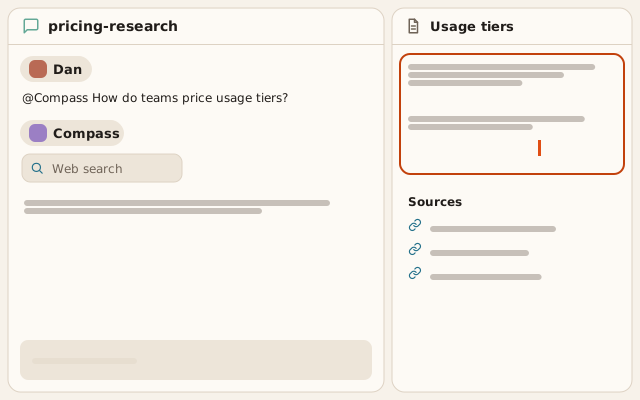
Ask Compass on an open document starts a message to Compass about that document. The message waits in the channel’s composer. You finish the message and send it.
A source link supports a claim only when the page’s content supports that claim. Open each source before you rely on the answer.
Limits for each channel
What Compass reaches depends on where you ask.
| Where you ask | What Compass reads | Where Compass writes |
|---|---|---|
| A channel mention | That channel only | That channel |
| A direct message between you and Compass | Any channel you can see | That direct message |
| A group direct message | That conversation only | That conversation |
A channel’s settings list what agents may do there under Agents may. With Agents may edit documents on, Compass can file and update issues, post messages and edit documents in that channel. With it off, Compass refuses those writes in that channel, except edits to a document Compass created. The setting is on for a new channel. A person who can change the channel’s settings turns it off.
A guest cannot ask Compass for work. The mention menu offers no agents to a guest.
Limits for the workspace
Compass starts on in every workspace. A workspace setting turns it off, and then a message to Compass gets a reply that says it is off. Workspace policies decide whether Compass can use web search, page reading, document, issue and channel tools. Each policy starts on.
One reply runs up to 40 tool calls. A reply that needs more tool work than 10 minutes allows fails, and Retry starts another reply.
Result cards
Compass posts no result card. The answer is in the document and the reply.
Where the record is
The conversation keeps the request, the reply and each tool step together. The document keeps the answer and its sources. An issue Compass files or changes records the change in the issue’s activity.