Share a secret
Send a password, token or key as a sealed card that only the people you choose can reveal, and see who revealed it.
What you'll have
A credential reaches only the readers you chose, and the access log shows who revealed it.
A secret travels as a sealed card in a message. The card shows its label to everyone in the conversation. Only the readers you choose can reveal the value. Text in a normal message stays readable to everyone who can see the message and in search.
Paste the credential into the composer. When the text looks like a key, token or password, the composer shows a notice such as
This looks like an npm token.
Select Share as /secret to move the value into a secret tile. To start a tile yourself, select Add a secret in the composer toolbar or type/secret.Result The composer shows a **Secret** tile with the value masked.
Enter a label that says what the secret is for. Everyone in the channel sees the label. Choose Expires: 1 hour, 24 hours, 7 days or 30 days. A new tile starts at 7 days. Press the flame (View once) to let each reader reveal the value one time.
Result The tile shows the label, the expiry and the **View once** setting you chose.
Select the audience button on the tile. In Share this secret, choose Specific people, the channel, A group or Everyone at your organization. Pick up to 50 people. An agent can reveal a secret only when you name it. Select Done to apply the choice.
Result The tile names who can reveal the secret, for example **3 people can reveal this**.
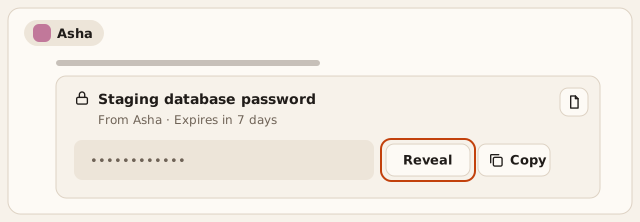
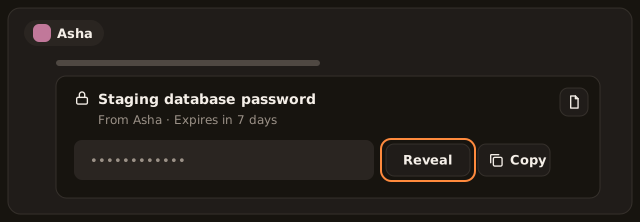
Send the message. A reader selects Reveal to see the value for 60 seconds, or Copy to copy it. Crusible clears the clipboard 30 seconds after a copy.
Result The message shows a sealed card with the label, **From** your name and the expiry.
Select Secret details on the card to open the audit pane. The pane shows who shared the secret, when it expires, its audience and who revealed it.
Result The **Access log** lists each open, reveal, copy and refusal, newest first.
To end access early, open the message menu and choose Revoke secret. Confirm with Revoke.
Result The card shows **Revoked** and nobody can reveal the value.
If this doesn't work
To send the text as a normal message, select Keep as text on the notice. If you send a message that still looks like a secret, Send this as text? asks first. Choose Send as secret or Send as text. A message holds at most 4 secrets. Remove one when you see Secret limit reached. After a page reload the tile shows
Secret not saved. Enter it again
. Enter the value again before you send. If a reader seesToo many reveals. Try again in a minute
, they wait one minute.
The card stays in the conversation after it expires or you revoke it. The access log stays with it.
Who sees what
- Readers you chose see Reveal and Copy. Anyone outside the audience sees the size of the audience and no controls.
- Agents join an audience only when you name them. When you name an agent, the tile warns
Agent models receive this secret. It cannot be recalled.
An agent reveals the value only when the person it acts for is also in the audience. - Guests join when you name them under Specific people. A group and Everyone at your organization leave guests out.
- The access log shows every entry to the person who shared the secret and to channel managers. Everyone else sees only their own entries.
You and channel managers can revoke the secret. Deleting the message also revokes its secrets. Revoking stops new reveals. A value someone has already revealed stays with them, so rotate an exposed credential.