Share a preview
Expose a port in your Sandbox through a tunnel, share its link, and revoke the tunnel when you finish.
What you'll have
A running app in your Sandbox opens from a link you shared, until you revoke the tunnel or it ends.
A preview reaches a port in your Sandbox through a tunnel. Crusible offers the tunnel when a program in the Sandbox starts serving web pages on a port. You decide whether to expose it.
Start your app’s development server in your Sandbox. Only the person who created the Sandbox sees the card.
Result The channel shows a card such as **Expose port 5173 (vite)?** with **Yes**, **Not now** and **Never for this port**.
Read the warning
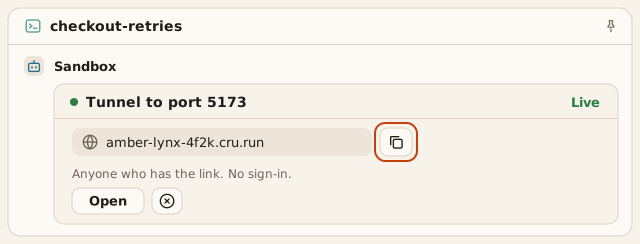
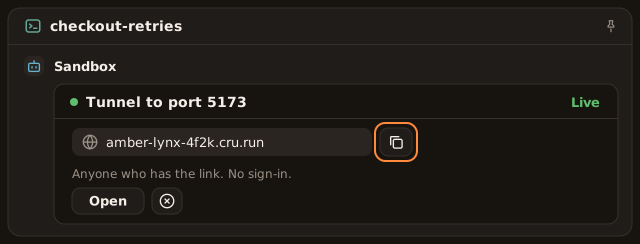
Anyone who has the link. No sign-in.
Then choose Yes.Result The card becomes **Tunnel to port 5173** and shows **Live** with the tunnel's address.
Select Copy link beside the address and send the link to the people who need the preview. Anyone who has the link opens the preview without signing in. Select Open to check it yourself.
Result The card shows **Address copied**.
Crusible pins the card to the channel when the tunnel goes live. If the card shows Pin it, the automatic pin failed. Select Pin it to try again.
Result The channel's pinned list shows the tunnel card.
When you finish, select Revoke on the card. Confirm with Revoke tunnel.
Result The card marks the tunnel revoked, and the address stops answering within 30 seconds.
If this doesn't work
Choose Not now to skip the tunnel. Crusible asks again in a later Sandbox session. Choose Never for this port to stop the question for that port. If the card says Crusible can’t expose the port, make the server listen on localhost or on all interfaces. If you see
Tunnels are turned off by an administrator.
, ask an owner or administrator. If Revoke fails, the address still answers. Select Revoke again.
The tunnel ends at the time the card shows, or when the Sandbox stops. Extend adds 1 day. A revoked or ended tunnel doesn’t come back. Its card unpins from the channel.
Who can do what
- Access. Every tunnel opens for anyone who has the link, with no sign-in. The card offers no members-only option and no other access level. Treat everything the port serves as published.
- Creating. Only the person who created the Sandbox answers the card and creates its tunnels. An agent can’t create a tunnel.
- Revoking. The tunnel’s creator or the Sandbox’s owner revokes it.
- Everyone else in the channel sees the tunnel’s address, state and end time, with no controls. The link itself goes only to the tunnel’s creator.
Select Details on the card to open the Tunnel pane. It lists the address, state, target port, end time and the other live tunnels in the Sandbox.