Set a sandbox environment
Set the environment variables and secrets every Sandbox starts with, for your organisation or for yourself.
What you'll have
Your environment variables and secrets saved, and present in every new shell of your Sandboxes.
A Sandbox is the isolated coding machine where agents run. Its shell environment comes from two pages in Settings. Settings names both pages Sandbox.
- The organisation page, at
/organisation/workspace-environment, sets values for every member. Owners and administrators edit it. Members see it read-only. - Your personal page, at
/me/environment
, sets values for your own Sandboxes. A personal value replaces the organisation value with the same name.
Open Settings. For your own values, open Sandbox under My settings. For organisation values, open Sandbox under Account.
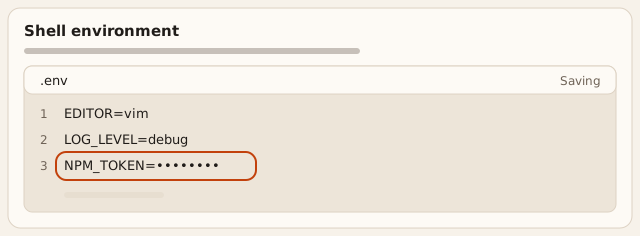
Result The page shows **Shell environment** with a `.env` editor.
In the Environment file editor, add one
NAME=valueline per variable. A name starts with a letter or an underscore and uses letters, digits and underscores. Lines that start with#are comments.Result Each line shows its line number in the gutter.
Stop typing. Crusible saves the file one second after your last keystroke. Crusible saves each new line as a secret and masks its value. Crusible never shows a saved secret value again. To change a secret, replace the bullets with the new value. To remove a variable, delete its line.
Result The editor header shows **Saving**, then the line shows `NAME=••••••••`.
Open a new terminal in your Sandbox and check the variable.
Result A new shell in your Sandbox has the variable.
If this doesn't work
When Crusible refuses a line, the editor lists it under the file as Line and its number, with the reason. Fix that line and stop typing to save again. If you see
The change was not saved. Try again.
, select Try again. If you seeThe entries did not load.
, select Try again. Crusible reserves names that start withCRUSIBLE_,LD_orGIT_CONFIG_, and names such asHOME,USERandSHELL. Choose another name. If you can’t edit the organisation page, ask an owner or administrator to make the change.
A new Sandbox starts with the saved values. A running Sandbox receives the change too. Terminals you open after the change see the new values. A shell you opened earlier keeps the values it started with. A hibernated Sandbox receives the change when it wakes.
The personal page warns Channel members can read values in their Sandbox.
Settings masks a secret, and the shell still holds it as a variable.
Put a credential here only when everyone who works in that Sandbox may use it.
Network policies and installed software
Planned The organisation page lists Network policies and Installed software with a Coming soon badge. Neither row has controls, and neither saves a setting.